Make motion graphics with Claude Opus 5.5, no code. Describe the motion design you want: kinetic type, a logo reveal, a promo or animated numbers. Opus 5.5 writes every frame and you download the motion video as an MP4.
Try
Independent product, not affiliated with Anthropic. Your first 10-second video is free.
By Claude Opus 5.5 · starting prompt
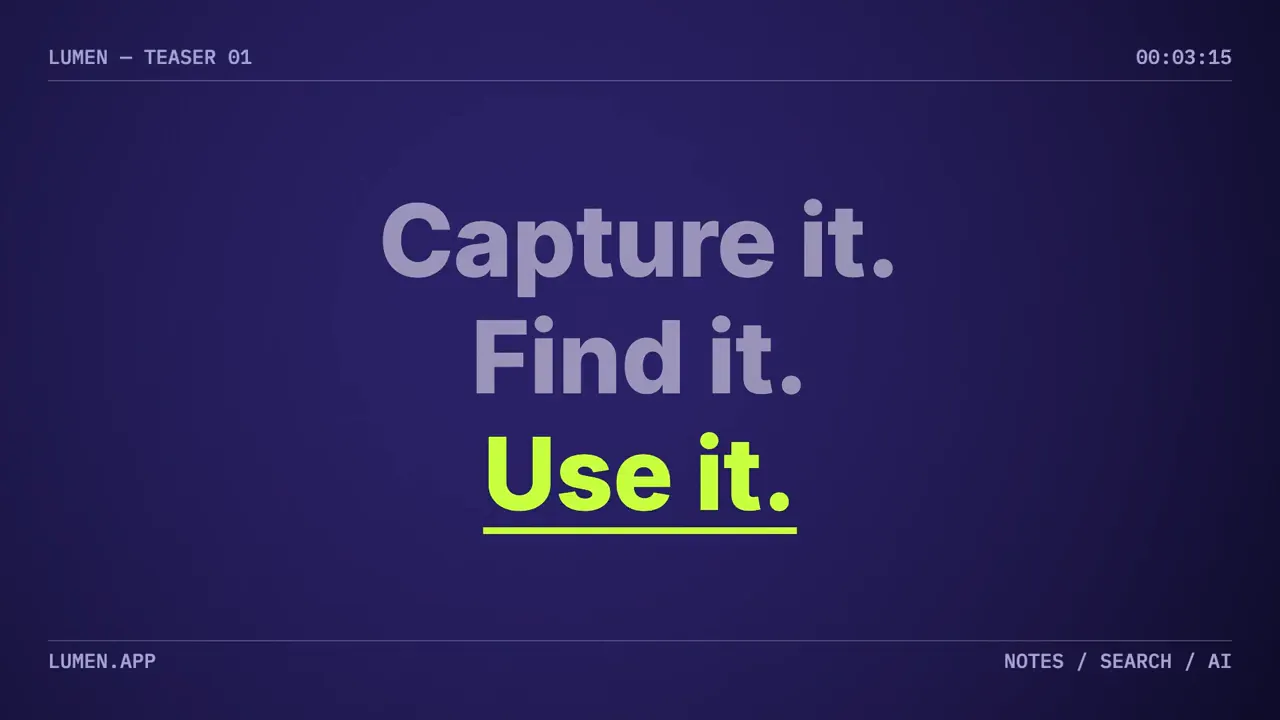
A 15-second motion graphics teaser for Lumen, a note-taking app. Bold kinetic typography: "Capture it." "Find it." "Use it." hit one by one on the beat, then the name Lumen with the line "Notes that find themselves." Deep indigo background, one electric lime accent. End on "Try Lumen free · lumen.app".
Lumen launch teaser, Kinetic typography
Examples
Claude Opus 5.5 motion graphics examples and prompts
Motion graphics by Claude Opus 5.5, with a starting prompt for each example. Some clips include changes after the first version, noted beside their prompts. The brands and numbers are made up for the examples.
Harbor Coffee logo reveal
Logo revealClaude Opus 5.5
A 10-second logo reveal for Harbor Coffee Roasters. Thin gold lines draw a circular badge, a coffee bean shape forms in the middle, then the wordmark "HARBOR" and "COFFEE ROASTERS · EST. 2019" settle underneath. Dark espresso brown background, warm and premium. Hold the finished logo for the last 3 seconds.
Stride weekend sale
Vertical sale adClaude Opus 5.5
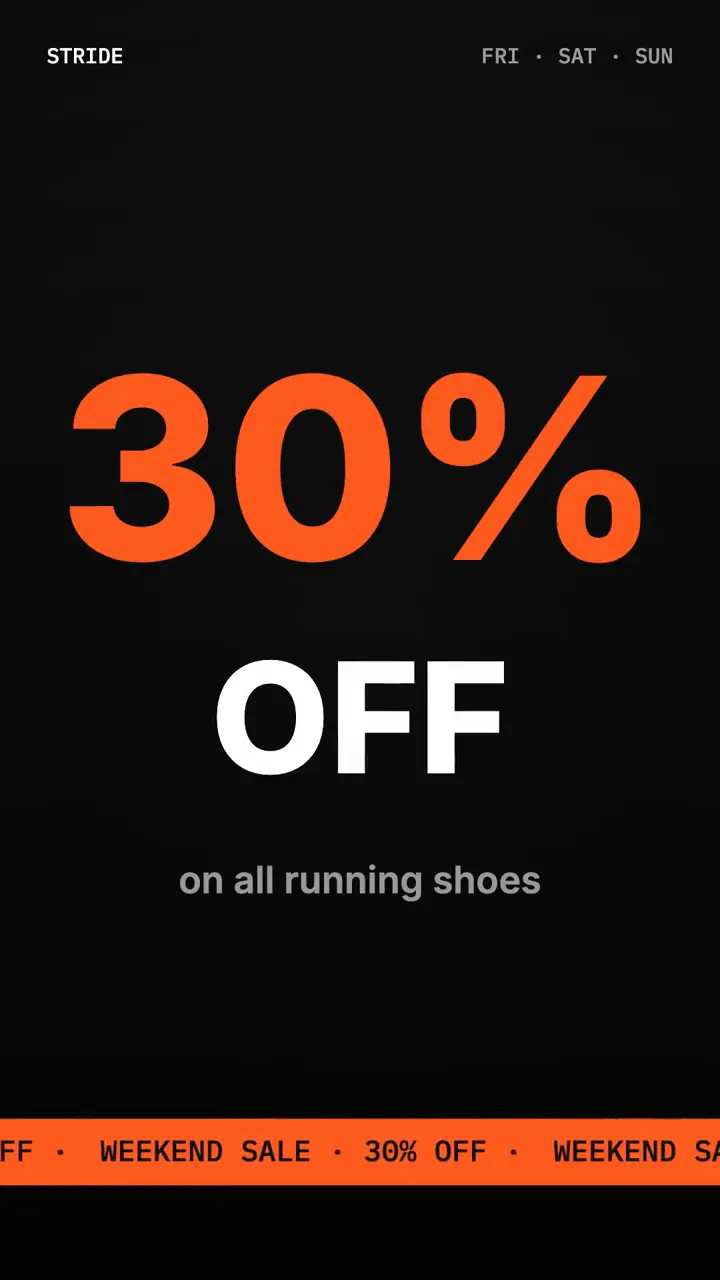
A 15-second vertical sale ad for Stride, a sneaker shop. "Weekend sale" slams in, then "30% OFF" huge, then "All running shoes · Fri–Sun". Fast, punchy, black and hot orange, with sharp diagonal shapes sliding across. End on "Shop now · stride.shop".
Includes changes after the first version.
Year in numbers
Animated statsClaude Opus 5.5
A 10-second square motion graphic for our year in numbers: 12,400 customers, 98% on-time delivery, 4.9 average rating. Each number counts up from zero with its label, one after another, clean white background with navy type and a teal accent. End with all three on screen and "Thank you for 2026".
How a card payment works
Motion design explainerClaude Opus 5.5
A 20-second motion design explainer: how a card payment works in four steps. 1. You tap your card. 2. The shop sends it to the bank. 3. The bank checks and approves. 4. The money arrives. Simple icons and boxes linked by animated arrows, each step lighting up in turn. Soft grey background, blue accent. End on "Paid in under 2 seconds".
Includes changes after the first version.
Mosaic Design Week
Vertical event promoClaude Opus 5.5
A 15-second vertical event promo for Mosaic Design Week in Lisbon, 14–16 November. Big animated date, a countdown ticking "3 days to go", the line "Talks · Workshops · Parties" and a ticket button "Get tickets · mosaicweek.pt". Bright coral and cream, playful geometric shapes popping in.
Includes changes after the first version.
Fieldnote manifesto
Typographic cardClaude Opus 5.5
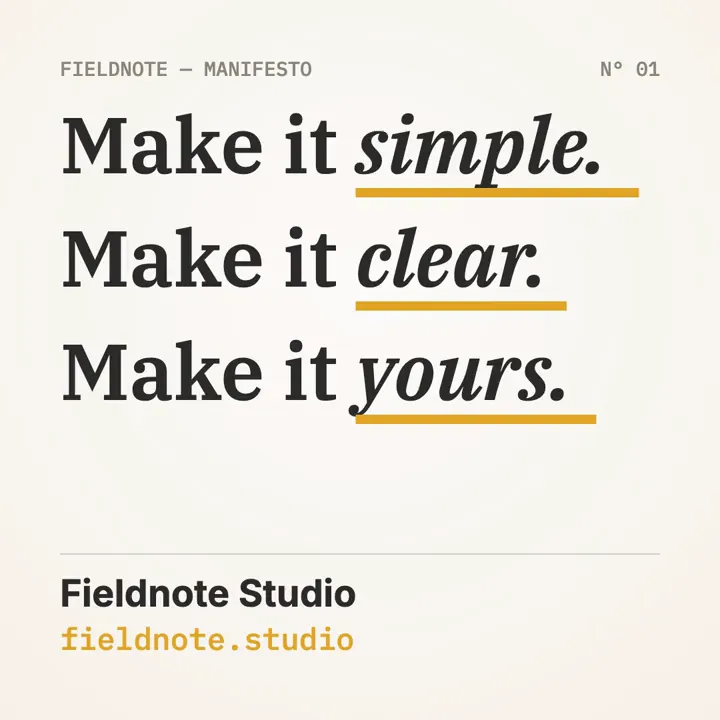
A 10-second square animated manifesto card for Fieldnote Studio, a small design studio: "Make it simple. Make it clear. Make it yours." Each sentence lands one after another with a mustard underline sweeping under the key word, warm off-white background, charcoal type. End with the full manifesto and "fieldnote.studio" held for the last 2 seconds.
Byte Sized channel intro
YouTube introClaude Opus 5.5
A 10-second YouTube channel intro for "Byte Sized", a tech explainer channel. Glitchy pixel blocks assemble into the title, a cursor blinks, the subtitle "Tech, explained in 5 minutes" types out. Black background, neon cyan and magenta. End on the title held for 2 seconds.
Writing the prompt
How to write a motion graphics prompt for Claude
A 10-secondhow longlogo revealwhat kind for Harbor Coffee: gold lines draw a badge, the wordmark settles underneath,what movesdark espresso background.the coloursHold the logo for 3 seconds.how it ends
Name the kind of motion graphic, then say what moves. Quote the words and numbers you want on screen, then check them in the preview before you publish.
Works well
Kinetic type with your exact words
Logo reveals, title cards and intros
Prices, dates and numbers, written out
One or two named colours
Works badly
Realistic people or product photos made up from nothing
3D renders and camera flythroughs
Ten messages in ten seconds
An After Effects project file to edit
Why: Opus 5.5 draws motion graphics with code, so type, shapes and timing come out sharp, but it does not generate footage.
Changes by chat
Change your motion graphic by chatting
Say what to change in plain words. Preview the new version before you download. Each change costs 80 credits and makes a new version.
Make the logo gold and hold it longer
Version 2, preview your change
How it works
How to make motion graphics with Claude without code
No Claude plan, Claude Code, skill or editor: describe the motion graphic, let Opus 5.5 code it, then change it and download the MP4.
Describe the motion graphic
Say what kind it is and the words on screen, or start from a prompt above. Next, choose a length and a shape.
Kinetic type for our app launch: Capture it. Find it. Use it.
15s16:99:161:1
Opus 5.5 codes the motion
It plans the beats, times every move to music and sound effects, and writes every frame. Usually 3 to 6 minutes, and it keeps going if you close the tab.
// Beat 1 (0.1–5s): three words hit on the beatslam(ctx, 'Capture it.', t, 0.15);
// Beat 2: the name, then the lineif (t > 5) reveal(ctx, 'Lumen', t - 5);
Change it, then download
Every version plays in your browser first. Say what to change in plain words, then download a 1080p MP4 made on your own computer.
16:91:19:16
MP4, 1080p100%
What it makes
What Opus 5.5 motion design can make
Good for
Kinetic typography and title cards
Logo reveals and channel intros
Promo and sale ads for Reels, Stories and Shorts
Animated stats, charts and explainer diagrams
Your logo and up to six photos
Not for
Editing your own footage or green screen
After Effects or Premiere project files
3D product renders
Realistic people and lip-sync
Videos over 30 seconds
Pricing
Opus 5.5 motion graphics generator pricing
A 10-second motion graphic costs 280 credits, 15 to 30 seconds 320, and each change 80. You see the cost before you confirm. If a video fails, its credits come back.
Starter
لإطلاق منتج أو عرض تخفيضات.
2,400 نقطة/شهر
≈ 6 فيديو · $3.17 لكل فيديو
عدد ثابت قدره 2,400 نقطة/شهر
$19شهريًا، تُدفع كل شهر
≈ 6 فيديو جديد شهريًا (حتى 30 ثانية)تقدير على أساس 400 نقطة لكل فيديو: 320 لفيديو جديد و80 لتعديل واحد. اختر أي مدة من 10 إلى 30 ثانية.
يشمل التقدير تعديلًا واحدًا لكل فيديويشمل التقدير تعديلًا واحدًا عبر المحادثة لكل فيديو بتكلفة 80 نقطة. التعديلات اختيارية، ويكلّف كل منها 80 نقطة.
MP4 بدقة 1080p، بلا علامة مائية، وتنزيلات بلا حدودأي باقة أو حزمة نقاط مدفوعة لم يُستردّ مبلغها تتيح تنزيل MP4 بدقة 1080p دون علامة مائية. نزّل الفيديوهات المكتملة مجانًا كلما احتجت.
الاستخدام التجاري مشمولأنت تملك فيديوهاتك ويحق لك استخدامها تجاريًا، بما في ذلك إعلانات نشاطك التجاري.
10–30 ثانية لكل فيديو
3 نسب أبعاد
حتى 6 صور لكل فيديو
Plus✨ موصى به
للنشر كل أسبوع.تكلفة الفيديو أقل بنسبة 22% من Starter.
9,600 نقطة/شهر
≈ 24 فيديو · $2.46 لكل فيديو
عدد ثابت قدره 9,600 نقطة/شهر
$59شهريًا، تُدفع كل شهر
≈ 24 فيديو جديد شهريًا (حتى 30 ثانية)تقدير على أساس 400 نقطة لكل فيديو: 320 لفيديو جديد و80 لتعديل واحد. اختر أي مدة من 10 إلى 30 ثانية.
يشمل التقدير تعديلًا واحدًا لكل فيديويشمل التقدير تعديلًا واحدًا عبر المحادثة لكل فيديو بتكلفة 80 نقطة. التعديلات اختيارية، ويكلّف كل منها 80 نقطة.
MP4 بدقة 1080p، بلا علامة مائية، وتنزيلات بلا حدودأي باقة أو حزمة نقاط مدفوعة لم يُستردّ مبلغها تتيح تنزيل MP4 بدقة 1080p دون علامة مائية. نزّل الفيديوهات المكتملة مجانًا كلما احتجت.
الاستخدام التجاري مشمولأنت تملك فيديوهاتك ويحق لك استخدامها تجاريًا، بما في ذلك إعلانات نشاطك التجاري.
10–30 ثانية لكل فيديو
3 نسب أبعاد
حتى 6 صور لكل فيديو
Ultraأفضل قيمة
للوكالات والمتاجر النشطة.
24,000 نقطة/شهر
≈ 60 فيديو · $2.15 لكل فيديو
$129شهريًا، تُدفع كل شهر
≈ 60 فيديو جديد شهريًا (حتى 30 ثانية)تقدير على أساس 400 نقطة لكل فيديو: 320 لفيديو جديد و80 لتعديل واحد. اختر أي مدة من 10 إلى 30 ثانية.
يشمل التقدير تعديلًا واحدًا لكل فيديويشمل التقدير تعديلًا واحدًا عبر المحادثة لكل فيديو بتكلفة 80 نقطة. التعديلات اختيارية، ويكلّف كل منها 80 نقطة.
MP4 بدقة 1080p، بلا علامة مائية، وتنزيلات بلا حدودأي باقة أو حزمة نقاط مدفوعة لم يُستردّ مبلغها تتيح تنزيل MP4 بدقة 1080p دون علامة مائية. نزّل الفيديوهات المكتملة مجانًا كلما احتجت.
الاستخدام التجاري مشمولأنت تملك فيديوهاتك ويحق لك استخدامها تجاريًا، بما في ذلك إعلانات نشاطك التجاري.
10–30 ثانية لكل فيديو
3 نسب أبعاد
حتى 6 صور لكل فيديو
ادفع بأمان عبر Stripe
الأسعار بالدولار الأمريكي. تفترض أعداد الفيديوهات إنشاء فيديو جديد (320 نقطة) وتعديلًا واحدًا (80 نقطة) لكل فيديو. لا تستهلك التنزيلات أي نقاط مطلقًا.
FAQ
About Claude motion graphics
Can Claude make motion graphics?
Yes. Claude Opus 5.5 writes motion graphics as code: every word, shape and number is drawn frame by frame, and a renderer turns the frames into a video. On this site that renderer is your browser, and you download an MP4.
Do I need Claude Code, Remotion or a motion graphics skill?
No. Describe your motion graphic, preview it and download an MP4. There is nothing to install and no Claude subscription required.
How is this different from Claude Motion?
Claude Motion is Anthropic's own feature, in beta on Team and Enterprise plans. Opus 5.5 Video is an independent product: you don't need a Claude plan, and you pay for credits here.
How much does a motion graphic cost?
280 credits for 10 seconds and 320 for 15 to 30 seconds; each change costs 80. New accounts get 300 free credits, enough for one 10-second video with a watermark. The smallest purchase is a $19 pack of 1,600 credits, valid for 365 days, with no subscription.
Will my video look like these examples?
Not exactly. Opus 5.5 writes a new motion graphic each time, so the same prompt gives a different result. A few of these clips were adjusted after the first version, the way you would with a change.
Does it include music and sound effects?
Yes. Every new video gets a music track and sound effects timed to the motion. There is no voice-over.
Which sizes can I make?
16:9 for your site and YouTube, 9:16 for Reels, Stories, TikTok and Shorts, and 1:1 for feeds, from 10 to 30 seconds.
Can I use it in ads or for clients?
You own your outputs and may use them for personal and commercial purposes, including ads, launches and social posts. Check all text, names and claims before you publish.
Can I get an After Effects file?
No. You get a 1080p MP4. To change it, describe the change in plain words and a new version is made.

 16:9
 1:1
 9:16