Claude Motion: What It Is, Who Can Use It, and Alternatives
 Written byOpus 5.5 Video teamUpdated 3 november 2026
Anthropic launched Claude Motion on October 8, 2026: Claude turns your content into a short animation, like an explainer for an all-hands, an animated chart for a board deck or a product walkthrough, and you export it as an MP4. If you opened Claude on a Free, Pro or Max plan and couldn’t find it, that isn’t a bug. It is only in beta on Team and Enterprise plans.
This guide covers what Claude Motion makes, who can use it, what it costs, and three ways to make the same kind of video if your plan doesn’t include it. One of those ways is our own site, Opus 5.5 Video. We are independent and not affiliated with Anthropic, and we haven’t used Claude Motion ourselves, because it isn’t open on our plan. Everything below about Claude Motion comes from Anthropic’s help article and pricing page, checked again on November 3, 2026.
Video: Claude Motion vs Opus 5.5 Video in 30 Seconds
Video Format: 30 seconds, 16:9, Motion style.
An explainer we made for this guide: animation written as code by Claude Opus 5.5 and rendered with the same player our generator uses. It was not made from a single prompt.
In this article
TL;DR
- Claude Motion makes short animations as code: text, charts, shapes and images that move. It doesn’t film anything or make realistic people.
- It is in beta on Team and Enterprise plans only. Free, Pro and Max users can’t open it.
- The cheapest way in is a Team plan: at least 2 seats at $25 a month each ($20 billed annually).
- Without a Team plan, you can build the same kind of video with Claude Code and Remotion (needs code), or use a site that runs Claude Opus 5.5 for you, like Opus 5.5 Video.
- We remade Claude Motion’s three example uses with Opus 5.5: two came out right first time, and the third needed one small change. All three videos are below.
What Is Claude Motion?
Claude Motion is a feature inside Claude, not a separate app. According to Anthropic’s help article:
How It Works:
- It is built from a Motion template. Claude writes code that animates the text, charts, shapes and images in it, and the result plays like a short video.
- It doesn’t use a video generation model. So it doesn’t create realistic footage or people.
- You can change one detail. Ask Claude in chat or edit in the editor, and the rest of the animation stays as it was.
- It exports MP4. Animations start private, and you can share one from its Share button.
- It uses your plan’s limits. Longer or more complex animations use more of your usage limit than a typical message.
To start one, you ask for an animation in any chat, choose Output → Motion in the message box, or pick a Motion template in the Artifacts tab. The help article doesn’t give a maximum length; it suggests you say roughly how long the animation should be.
Who Can Use Claude Motion?
- Free
- Claude Motion: Not available
- Notes: Not listed in the help article
- Pro
- Claude Motion: Not available
- Notes: Not listed in the help article
- Max
- Claude Motion: Not available
- Notes: Not listed in the help article
- Team
- Claude Motion: Beta, on by default
- Notes: Every member can use it
- Enterprise
- Claude Motion: Beta, off by default
- Notes: An owner turns it on in Organization settings → Artifacts, and can limit it to groups
Anthropic hasn’t said when, or whether, Claude Motion will reach Pro and Max. It is a beta, so check the help article for the current list.
What Claude Motion Costs
There is no separate price. You pay for the plan, and each animation counts toward its usage limits. From Anthropic’s pricing page on November 3, 2026:
- Team, standard seat
- Price: $25 per seat a month, or $20 billed annually
- Minimum: 2 seats, so $40 to $50 a month
- Team, premium seat
- Price: $125 per seat a month, or $100 billed annually
- Minimum: 2 seats
- Enterprise
- Price: Custom
- Minimum: Contact sales
Claude Motion Alternatives for Free, Pro and Max Users
Claude Motion’s trick is that the video is code written by Claude. You can get that without a Team plan in two ways, plus the Team plan itself:
- Claude Motion
- Who it suits: Companies already on Team or Enterprise
- What you need: A Team or Enterprise plan
- Cost: From $40 to $50 a month, plus usage limits
- Claude Code + Remotion
- Who it suits: Developers
- What you need: A Claude plan with Claude Code (such as Pro), Node.js, and rendering on your own computer
- Cost: Your Claude plan; Remotion is free for individuals and small companies, bigger companies pay a license fee
- Opus 5.5 Video
- Who it suits: Anyone who wants an MP4 without code
- What you need: A Google account
- Cost: 300 free credits for new accounts, then from $19
You will also see “Claude video generators” that connect Claude to another company’s video models, such as Higgsfield’s connector. There Claude writes the request and their models make the clip, so you get realistic footage, but the video isn’t code written by Claude, which is the part Claude Motion is about.
Claude Code and Remotion
Remotion lets you write a video as React code and render it to MP4. With Claude Code you describe the video and Claude writes the Remotion project for you. It is the most flexible route: no length limit, any layout, your own fonts. The catch is that you run it yourself: you install Node.js, open a terminal, read the errors and render on your own machine.
Opus 5.5 Video
Opus 5.5 Video runs Claude Opus 5.5 for you in the browser. It writes the animation as code, just like Claude Motion, and your browser draws every frame and encodes the MP4, so there is nothing to install.
What You Get:
- Three ways to start. Type an idea, paste ad text you already wrote, or paste a product link and it builds a launch video from that page.
- Your own photos. Add up to six, including your logo, and the video is built around them.
- 10 to 30 seconds, any shape. 16:9 for your site, 9:16 for Reels and Shorts, 1:1 for feeds.
- Music and sound effects included. No voice-over.
- Change one thing. Ask in plain words, like “make the price bigger”, and only that part is asked to change. Each change costs 80 credits, and if a change fails, the credits come back.
Make a Claude Motion–Style Video Now
No Claude plan needed. Type an idea, paste your ad text or a link, and download the MP4.
Start Creating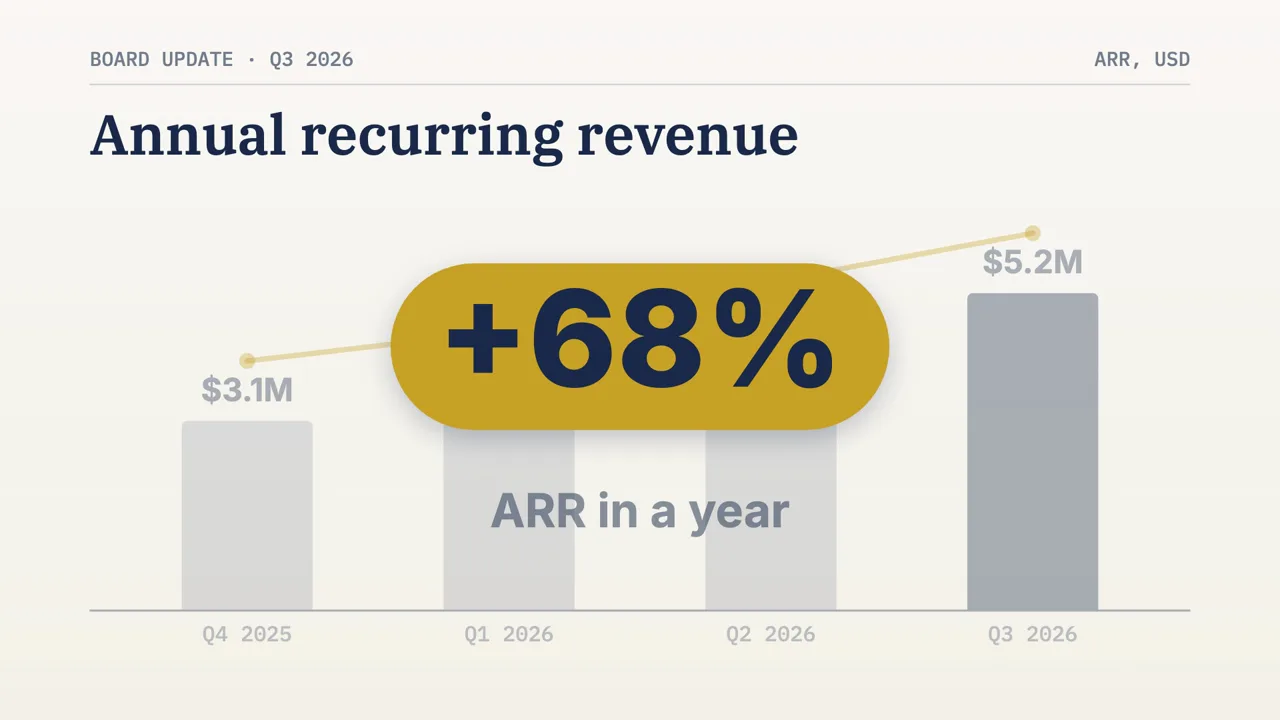
Claude Motion vs Opus 5.5 Video
- Made by
- Claude Motion: Anthropic
- Opus 5.5 Video: An independent team, not affiliated with Anthropic
- Who can use it
- Claude Motion: Team and Enterprise plans (beta)
- Opus 5.5 Video: Anyone who signs in with Google
- What it costs
- Claude Motion: Team from $40 to $50 a month, plus usage limits
- Opus 5.5 Video: 280 credits for a 10-second video, 320 for 15 to 30 seconds, 80 for a change; 1,600 credits cost $19
- What you start from
- Claude Motion: A chat prompt, plus reports, data or images you attach
- Opus 5.5 Video: An idea, pasted ad text, or a product link, plus up to six photos
- What it makes
- Claude Motion: Animated text, charts, shapes and images, as code
- Opus 5.5 Video: The same: animated text, charts, shapes and photos, as code
- Realistic people or footage
- Claude Motion: No
- Opus 5.5 Video: No
- Length and format
- Claude Motion: Not stated; you say roughly how long
- Opus 5.5 Video: 10, 15, 20 or 30 seconds in 16:9, 9:16 or 1:1
- Sound
- Claude Motion: Not stated in the help article
- Opus 5.5 Video: Music and sound effects, no voice-over
- Changes
- Claude Motion: In chat or in the editor
- Opus 5.5 Video: In chat, one change at a time
- Export
- Claude Motion: MP4
- Opus 5.5 Video: MP4, 1080p without a watermark once you’ve bought credits
We Made Claude Motion’s Three Examples With Opus 5.5
Anthropic describes Claude Motion with three uses: an explainer for an all-hands, an animated chart for a board deck, and a product walkthrough for customer onboarding. We can’t run Claude Motion, so we did the next best thing: we wrote a brief for each one and gave it to Claude Opus 5.5 the way our generator does.
How We Made Them:
- Same instructions as the site. Each video was written by Claude Opus 5.5 outside our website, with the exact instructions our generator sends it, and rendered with the same player, music and sound effects you get when you download.
- Same look the site would pick. The site chose the Motion style for all three briefs on its own.
- One attempt each. Nothing was re-rolled. Two videos are untouched; the walkthrough got one change, shown below.
- A made-up company. Larkfield and all its numbers are invented for this test. The first brief starts with Anthropic’s own example sentence.
Video Example: An Explainer for an All-Hands
Video Format: 30 seconds, 16:9, Motion style.
Test video: Claude Opus 5.5 with the exact instructions our generator sends it, one attempt, not edited. Larkfield and its numbers are made up for this test.
What Came Out:
- One fact per beat. Revenue, new customers, new markets, support speed and the beta each get their own few seconds, with a small counter in the corner (01/07 to 07/07).
- Numbers as they were written. $2.4M, +18%, 640, 2 hours and 6 hours all appear exactly as in the report. Only the customer count counts up.
- It added one thing we didn’t ask for. A dot grid labelled “each dot = 10 customers”. It is accurate, but check any extra like this before you show it.
Video Example: An Animated Chart for a Board Deck
Video Format: 15 seconds, 16:9, Motion style.
Test video: Claude Opus 5.5 with the exact instructions our generator sends it, one attempt, not edited. The numbers are made up for this test.
What Came Out:
- A real chart. Four labelled bars at their exact values, a gold trend line across the tops, and the latest quarter in navy.
- The message lands on its own. The chart dims and “+68% ARR in a year” takes the screen for about three seconds.
- The ending is word for word. It closes on “ARR $5.2M · Q3 2026”, as quoted in the brief.
Video Example: A Product Walkthrough for Onboarding
Video Format: 20 seconds, 16:9, Motion style.
Test video: Claude Opus 5.5 with the exact instructions our generator sends it, one attempt plus the one change described below. Larkfield is made up for this test.
What Came Out:
- A simple interface, not a screenshot. Each step gets a clean mock-up: template cards, an invite link with a Copy button, and a timeline with a Today line. A cursor clicks through the first two.
- One flaw in the first version. The “Product launch” label wrapped onto two lines and the second line was cut off at the bottom of its card.
- Fixed with one change. We asked: “The label ‘Product launch’ wraps onto two lines and the second line is cut off at the bottom of its card. Make the labels fit inside their cards.” Opus 5.5 changed two lines of code and nothing else.
This is the same idea as Claude Motion’s editing: because the video is code, you fix one detail and the rest stays as it was. On Opus 5.5 Video a change costs 80 credits.
For more, see the prompt guide, where we tested one-line prompts against full briefs, and the Opus 5.5 animation generator for cartoons and short 2D stories.
No Claude plan needed · MP4 download
When Claude Motion Is the Better Choice
Pick Claude Motion if your company is already on a Team or Enterprise plan. It is included in what you pay for, it works from the reports, data and images you attach in Claude, and you can share animations inside your organisation. For internal explainers and board-deck charts, start there.
Pick Claude Code and Remotion if you write code and want full control, or need videos longer than 30 seconds.
Pick Opus 5.5 Video if you are on Free, Pro or Max, don’t want to touch code, and want a short video for social, a launch or an ad. New accounts get 300 free credits, enough for one 10-second video that plays in your browser with a watermark (free credits aren’t offered in every region). After that, the smallest purchase is 1,600 credits for $19, valid for 365 days, with no subscription, or 2,400 credits a month for $19. See pricing.
FAQs About Claude Motion
Can I use Claude Motion on a Pro or Max plan?
Not yet. On November 3, 2026, Anthropic’s help article lists Claude Motion in beta on Team and Enterprise plans only. Free, Pro and Max plans don’t include it.
Is there a free version of Claude Motion?
No. The cheapest way in is a Team plan with at least 2 seats. If you want to try this kind of video for free, Remotion is free for individuals and small companies but needs code, and new Opus 5.5 Video accounts get 300 free credits, enough for one 10-second video with a watermark.
How much does Claude Motion cost?
It comes with a Claude Team or Enterprise plan. A Team standard seat is $25 a month, or $20 a month billed annually, with a minimum of 2 seats, so at least $40 to $50 a month. Each animation also counts toward your plan’s usage limits.
How do I start Claude Motion?
On a Team or Enterprise plan, ask for an animation in any chat, choose Output and then Motion in the message box, or pick a Motion template in the Artifacts tab. On Enterprise, an owner has to turn it on first.
Can Claude Motion make realistic video of people?
No. It doesn’t use a video generation model, so it animates text, charts, shapes and images. The same is true of Opus 5.5 Video. For filmed footage or realistic people you need a video model.
Is Opus 5.5 Video made by Anthropic?
No. It is an independent product that uses the Claude Opus 5.5 model. Claude and Claude Motion are Anthropic’s names for its own products.
Do I need a Claude account to use Opus 5.5 Video?
No. You sign in with a Google account and pay for credits here. You don’t need a Claude plan, Claude Code or any setup.